
In the vast, chaotic, and incredibly lucrative world of Chinese e-commerce, finding the exact item you want can feel like searching for a needle in a haystack—especially when you don’t speak the language. As a sourcing specialist who has navigated these digital aisles for over two decades, I have seen the platform evolve from a simple marketplace to an AI-driven behemoth. I can tell you with absolute certainty: the single most powerful tool in your arsenal is the Taobao reverse image search.
Whether you are a casual shopper hunting for unique mid-century modern home decor or a business owner scouting for high-margin inventory, mastering this feature is non-negotiable. However, recent UI updates in late 2024 and 2025 have made this feature elusive for international users. In this comprehensive guide, I will walk you through exactly how to master the art of visual sourcing, navigate the technical glitches, and ensure you never lose track of a product again.
Why You Need Taobao Photo Search
Before we dive into the technical “how-to,” let’s briefly discuss the “why.” Taobao is the world’s biggest e-commerce website, but it is built entirely in Chinese. While translation plugins like Google Translate work reasonably well for interface navigation, they fail miserably at describing product aesthetics.
For example, a “mid-century modern chair” might be translated into Chinese as “middle century style seat,” which yields very different search results than the specific Chinese keyword “中古椅” (Vintage/Used Style Chair). Translation plugins cannot describe the specific cut of a trench coat, the glaze on a ceramic vase, or the texture of a fabric with 100% accuracy.
💡 The “Keyword Trap”
Did you know? Many Chinese sellers use specific, non-translatable slang to describe fashion trends. “INS Style” (referring to Instagram aesthetics) or “BM Style” (referring to Brandy Melville style) are keywords you would never guess to type in Chinese. Visual search bypasses this entirely by matching pixels rather than words.
Visual search bridges the language gap. Instead of guessing keywords, you simply upload a photo. The algorithm analyzes the shape, color, and texture, matching it against billions of listings. For international buyers, Taobao visual search is not just a convenience; it is the only way to bypass the linguistic barrier to find the original manufacturers and the best prices.
Prerequisites: The Account Barrier
Before you attempt to use any image search feature, there is a harsh reality we must address: Taobao is a walled garden. In the past, you could browse relatively freely. Today, Taobao aggressively blocks unregistered users to prevent data scraping.
If you attempt to use the image search feature without being logged in, you will likely be redirected to a login page immediately. To ensure your sourcing session is uninterrupted:
- Register an Alipay Account first: It is often easier to register for the international version of Alipay app on your phone using your local mobile number.
- Login to Taobao via Alipay: Use the “Login with Alipay” option on Taobao. This reduces the risk of your account being flagged for security reasons, a common issue for foreign IP addresses.
The Gold Standard: Taobao Mobile App Method
The mobile application is currently the most reliable platform for performing a search by picture on Taobao. The developers have optimized the app significantly for visual inputs, utilizing your phone’s camera hardware to aid the AI. It is far more robust than the desktop version.
Step-by-Step Mobile Guide
1. Download & InstallEnsure you have the official Taobao app (手机淘宝) installed from the App Store or Google Play. Ensure it is updated to the latest version (v10.0+ recommended).
2. Locate the CameraOn the main search bar at the very top of the homepage, you will see a small camera icon on the far right side.
3. Snap or UploadTap the icon. You can either take a live photo of a physical object or tap the “Photo Album” icon (usually bottom left) to upload a screenshot.
The “Crop and Focus” Trick: Once the image scans, the app usually auto-detects the object. However, if your photo contains multiple items (e.g., a living room scene), the app might focus on the rug when you want the sofa. Look for the “cropping tool” icon after the scan completes. You can manually adjust the bounding box to force the algorithm to re-scan only the specific area you want.
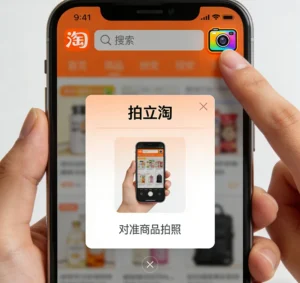
Caption: This interface (screenshot from version 10.32.1) demonstrates how to search by image on taobao mobile app efficiently.
The mobile app is incredibly fast. Within seconds, you will be presented with a list of identical or similar items, sorted by relevance. This is the primary method I use when I am on the go in Guangzhou markets, checking if a supplier’s quote is competitive against online listing

Senior Procurement Strategist at SnapSpreadsheet
With over 20 years dedicated to the sourcing industry in Guangzhou and Shenzhen, I specialize in “reverse proxy shopping” for Western markets. My expertise lies in connecting North American and European clients with hard-to-find Chinese manufacturers. At SnapSpreadsheet, I lead the sourcing team, ensuring that once you find a product via image search, it arrives at your doorstep safely and legally.
The Desktop Dilemma: How to Use Taobao Image Search on PC
This is where things get tricky for many international users. Years ago, the desktop site (PC version) had a prominent camera icon right in the search bar. However, starting around 2021 and continuing into 2025, Taobao has intermittently removed this feature from the global version of their site (world.taobao.com), likely to push traffic toward their mobile app ecosystem.
Learning how to use taobao image search on pc now requires specific workarounds. If you simply type “taobao.com” and are redirected to the “World” version, you likely won’t see the camera.
Method 1: The Region Switch (The “Mainland” Trick)
Sometimes, the camera icon disappears from the global version but remains active on the domestic Mainland China version. This is the first troubleshooting step you should take:
- Go to the Taobao homepage top bar.
- Locate the region selector (usually top left, labeled as “Global” or “Worldwide”).
- Switch the region to “Mainland China” (中国大陆).
Often, the page will refresh, and the familiar camera icon will reappear in the orange search bar. If it does, simply click it and upload your file.
Method 2: The “Sourcing Hybrid” Workflow
If the icon is completely gone from your browser (which happens frequently during platform updates), do not waste hours looking for a script. I recommend the Hybrid Sync Method, which is actually faster for bulk research:
- Phone: Perform the search on your Mobile App using the camera.
- Action: Add the best results to your “Favorites” (click the star icon) or “Shopping Cart.”
- Computer: Log into your account on your PC browser.
- Result: Go to your Cart/Favorites page on PC. The items are now there, ready for you to inspect with full screen translation and detailed analysis.
Taobao Reverse Image Search Chrome Extension Options
For high-volume sourcers or dropshippers working from a desktop who cannot switch between phone and PC constantly, a taobao reverse image search chrome extension is a lifesaver. These third-party tools integrate directly into your browser, effectively restoring the functionality that Taobao removed.
These extensions work by utilizing the API of Alibaba’s image search engine (often via 1688.com or Taobao) and presenting the results in an overlay.
To use these, simply install them from the Chrome Web Store. Once installed, navigate to any website (like Amazon, Pinterest, or a competitor’s store), right-click on a product image, and select “Search on Taobao.” This effectively forces a Taobao photo search without needing to be on the Taobao homepage.
Note on Security: While these extensions are useful, they track your browsing data to function. If you are working on sensitive proprietary designs, I recommend using a separate browser profile for these tools.
Find Taobao Products by Image for Dropshipping
For e-commerce entrepreneurs, the ability to find taobao products by image for dropshipping is a massive competitive advantage. When you see a trending product on TikTok or Instagram, speed is essential. You cannot waste days describing the item to a sourcing agent. You need to find the source factory immediately to calculate your potential margins.
My Professional Workflow for Dropshipping Research
- Capture the Trend (The Input): Take a high-quality screenshot of the trending item from social media. Try to get a frame where the product is fully visible and not blurred by motion.
- Execute the Search: Use the search by image taobao feature on the mobile app. Do not just look at the first result.
- The “Sales Volume” Filter (Crucial): Once the results load, locate the sort bar and click on “Sales” (销量). This reorders the list from highest volume to lowest. Why does this matter?
- High sales usually indicate the original factory or a master distributor.
- Low sales often indicate a reseller who is buying from the factory and marking it up.
- The “Image Review” Verification: This is my secret weapon. Do not trust the studio photos. Click into the product, scroll down to the reviews (评价), and look for the “Image Reviews” (图片). This shows you what the product actually looks like in real lighting, without Photoshop. If the plastic looks cheap here, it will look cheap to your customers.
💰 The Profit Arbitrage Example
By using visual search, you identify the 800% markup, allowing you to source direct and undercut competitors.
Expert Tips for Accurate Visual Search Results
As someone who uses Taobao visual search daily for SnapSpreadsheet clients, I have learned that the AI is only as good as the data you feed it. Garbage in, garbage out. Here are my professional tips to improve accuracy:
1. Isolate the Subject
The algorithm struggles with cluttered backgrounds. If you are taking a photo, place the object against a plain white wall or sheet. If you are uploading a screenshot, crop out any text, overlay buttons, or distracting elements before uploading.
2. Lighting and Texture
Avoid shadows that obscure the product’s details. Natural, diffuse light is best. For clothing, texture matters. A photo taken in dim light might make a silk dress look like polyester, causing the AI to match you with cheap knockoffs instead of the high-quality original.
3. Category Filtering
After the search, Taobao will often ask you to confirm the category (e.g., “Shoes” vs. “Sports Equipment” or “Top” vs. “Dress”). This often appears as a small row of bubbles at the top of the results. Selecting the correct category refines the Taobao photo search drastically.
Understanding Your Search Results
Once you have performed a search by picture on Taobao, you will likely be bombarded with hundreds of results. How do you choose? Price isn’t everything.
- Price Discrepancies: You might see the same handbag listed for 50 RMB and 500 RMB. Usually, the lowest price uses a stolen stock photo but ships a lower quality version. The highest price might be a reseller. Aim for the mid-range price with high transaction volume.
- The “Gold Medal” Icon: Look for the Gold Medal seller icon (a small gold medal next to the seller name). This indicates a strong track record of shipping speed and accuracy.
- Tmall vs. Taobao: If the result has a red “Tmall” logo, it is from a registered brand store (B2C). If it doesn’t, it is a C2C (individual) seller. Tmall results are generally more reliable for quality, while Taobao sellers are cheaper and more flexible.
You Found It. Now, How Do You Buy It?
This is the final hurdle. You have successfully used Taobao reverse image search to find that perfect dress or that specific electronic component. But when you try to checkout, you hit a wall: Taobao sellers generally do not speak English, many do not accept international credit cards directly, and shipping small parcels individually to the US or Europe is prohibitively expensive or complicated.
This is where we come in.
Maximize Your Sourcing with SnapSpreadsheet
At SnapSpreadsheet, we are the largest reverse purchasing platform specializing in sourcing products from China for customers in the United States, Canada, the UK, Australia, Germany, France, and across Europe and the Americas.
Once you find your item using the image search techniques above, simply copy the link and paste it into our system. We handle:
- ✅ Payment: We pay the seller in RMB, you pay us in your local currency.
- ✅ Quality Check (QC): We receive the item at our warehouse and send you actual photos (QC pics) before it leaves China.
- ✅ Consolidation: Buy from 10 different Taobao sellers? We pack them into one box to save you up to 70% on shipping.
Frequently Asked Questions (FAQ)
1. Can I use Taobao image search without an account in 2025?
Generally, no. Taobao has become stricter over the years. To browse freely and use the Taobao search by image features effectively, you must register an account. It protects the platform from bots and ensures you can save your findings.
2. Why is the Taobao image search icon missing on my browser?
Taobao frequently updates its UI. The camera icon is often removed from the global site (world.taobao.com). Switch your region to “Mainland China” (中国大陆) in the top left corner, or use the mobile app syncing method described in this article.
3. Is the visual search feature accurate for niche items?
Yes, surprisingly so. Whether it is industrial parts, cosplay props, or specific ceramic styles, the AI is trained on billions of SKUs. However, for extremely rare vintage items or custom-made art, results may vary.
4. Does SnapSpreadsheet work with 1688 and Tmall as well?
Absolutely. You can use image search on Taobao, Tmall, or 1688 to find products, and our agents can purchase from any of these platforms on your behalf, consolidating everything into one shipment.
Conclusion
Mastering the taobao reverse image search is the definitive skill that separates the amateur shopper from the professional sourcer. It removes language barriers, saves time, and unlocks the true depth of China’s manufacturing capabilities. Whether you are using the mobile app for quick checks or a taobao reverse image search chrome extension for deep market research, these visual tools are essential.
However, finding the product is only step one. The logistics of payment, quality control, and international shipping are where many ventures fail. By following the steps outlined in this tutorial, you are equipped to navigate the marketplace with precision. And when you are ready to bring those products home, SnapSpreadsheet is here to handle the heavy lifting.
Don’t let the language barrier stop you from accessing the world’s factory. Upload your image, find your treasure, and let us bring it to your door.
